Quickstart: repo to MCP
Create and verify your first hosted MCP server from a GitHub repository or OpenAPI specification.
You need an Evlio workspace with permission to create collections and MCP servers, an API source, and a reachable upstream API. Use a test account with read-only access for your first call.
Start here
Sign in at evlio.xyz/app and select the workspace you want to use. You can explore the supplied demo and onboarding tour before connecting your own API.
Build your catalog

The living API catalog
Every API in one scored, searchable place, refreshed on each scan with owners and last commit.

Hosted MCP servers
Turn any collection into a hosted MCP server where you pick exactly which operations become tools.
Trust your contracts

API contracts
Compose a versioned, governed promise from your collections — field-level PII control, drift alerts, and one-click publishing included.

Spec quality & scoring
30+ checks across design, developer experience, AI-readiness, and security produce a grade you can trust.
Test and watch

API testing
Fire real requests through an SSRF-safe proxy and generate client snippets in seconds.

MCP insights & logs
See which agents call which tools, with latency, error rate, and token usage per server.
Go further

AI assistant & semantic search
Chat with your catalog and search specs semantically, with tool-calling over your collections.

The enterprise MCP gateway
Hosted tools use the configured upstream authentication and record call activity. Saved deployment credentials are encrypted at rest.
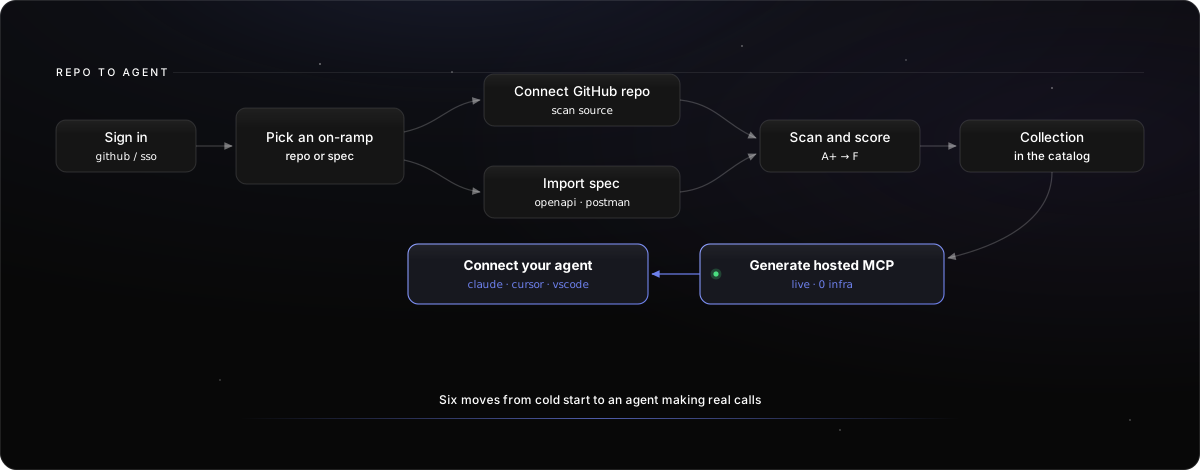
Follow the walkthrough below to reach a first verified tool call. Allow a repository scan to complete before reviewing its collection.
The path from repo to agent
1
Connect a source
Connect GitHub and choose a repository and branch, or import an OpenAPI file. Confirm you selected the intended workspace. Each connected repository counts toward your plan's repository limit.
2
Inspect the result
Wait for the scan or import to complete. Open the collection and confirm the expected endpoints and schemas are present.
3
Review quality
Inspect quality and coverage findings. Fix missing descriptions and schemas that affect the operations you want to expose.
4
Configure an MCP
Create an MCP server from the collection. Name it, select a small read-only operation set, and configure the upstream base URL and authentication.
5
Publish and connect
Publish the reviewed deployment; a published server uses one of your plan's hosted MCP server slots. Open its install page, select your client, copy the generated setup, and complete authentication. Connect your MCP client has the steps for each client.
6
Verify a call
Ask for a known test record or list result. Confirm the response and find the call in MCP logs. Check the tool list contains only the intended operations.
The upstream API must be reachable by the hosted service. A draft MCP is not callable. Collection refreshes do not automatically publish new tool definitions; review and publish changes separately.
Troubleshoot the first call
If no endpoints appear, inspect the source format or scan result. If authentication fails, verify scopes and reconnect. If the client sees old tools, confirm the deployment is published and reconnect the client. Troubleshooting covers scans, network access, authentication, publishing, and plan-limit errors.
From the terminal
The same path with the Evlio CLI (evlio-cli 1.2.0 or later). Replace the repository, server name, and operation with your own, and use the slug returned by mcp create.
uv tool install evlio-cli
evlio auth login
evlio --yes repo connect acme/payments --branch main --wait
evlio collection endpoints "Payments"
evlio --collection "Payments" --yes mcp create --name "Payments MCP" --operations "GET /payments" --auth-type bearer --draft
evlio --yes mcp publish payments-mcp
See the CLI command reference for every option.
On this page
- Quickstart: repo to MCP